
Office coffee machine troubleshooting should start with basic checks: confirm power, water, beans, waste levels and removable parts. Follow the displayed instructions, clean only accessible components and restart the machine once. Stop immediately if you find leaks, electrical faults, burning smells, persistent error codes or internal mechanical problems.
Introduction
A failed coffee machine can disrupt an entire workplace, particularly during the morning rush. The safest response is not to start dismantling it. You need to identify what staff can check, what requires routine cleaning and what must be handed to a qualified technician.
This guide covers common commercial espresso machine error codes, grinder failures, blocked steam wands, water problems and inconsistent coffee. It also explains how proper maintenance and accountable service support reduce downtime.
Key Takeaways
Most office coffee machine problems come from a small group of causes: empty supplies, incorrectly fitted parts, cleaning issues, interrupted water flow or faults requiring technical attention. A structured response prevents unsafe repairs, unnecessary service calls and repeated downtime.
- Check power, water, beans, milk and waste containers before assuming the machine has failed.
- Record the complete error message rather than clearing it repeatedly.
- Never remove electrical covers or reach inside a powered machine.
- Clean accessible grinder and steam components according to the manufacturer's instructions.
- Stop using any machine that leaks near electrical connections or smells burnt.
- Call a technician when an error returns after one safe restart.
Office Coffee Machine Troubleshooting Summary
Use the symptom to narrow down the likely cause, then perform only the checks intended for everyday operators. If the quick fix does not work, leave the machine switched off where safety is uncertain and give the service technician an accurate description.
| Symptom | Likely cause | Safe operator check | When to call for service |
|---|---|---|---|
| Machine will not start | Power interruption, safety switch or internal fault | Check the wall outlet, plug and visible power switch | Power remains unavailable or a safety switch trips again |
| Coffee machine not grinding | Empty hopper, obstructed bean feed or grinder fault | Refill beans and check that the hopper is seated correctly | Grinder makes abnormal noises or remains inactive |
| Coffee runs slowly | Grind setting, compacted coffee path or scale | Run the approved rinse and cleaning process | Flow remains restricted after cleaning |
| No coffee dispenses | Water supply, blocked outlet or brewing fault | Check water supply and removable components | The pump runs without producing coffee |
| Steam wand blocked | Dried milk residue or internal steam fault | Wipe and purge the wand using the approved method | Steam remains weak or the wand cannot be cleared safely |
| Error message appears | Cleaning, sensor, supply or component fault | Photograph the message and follow the operator manual | The same message returns after one restart |
| Water under machine | Drip tray overflow, loose waste container or leak | Empty and refit accessible containers | Water continues to appear or reaches electrical parts |
| Coffee tastes wrong | Stale beans, poor cleaning or incorrect grinder setup | Replace old beans and complete approved cleaning | Taste remains inconsistent across repeated brews |
Start With a Safe Initial Check
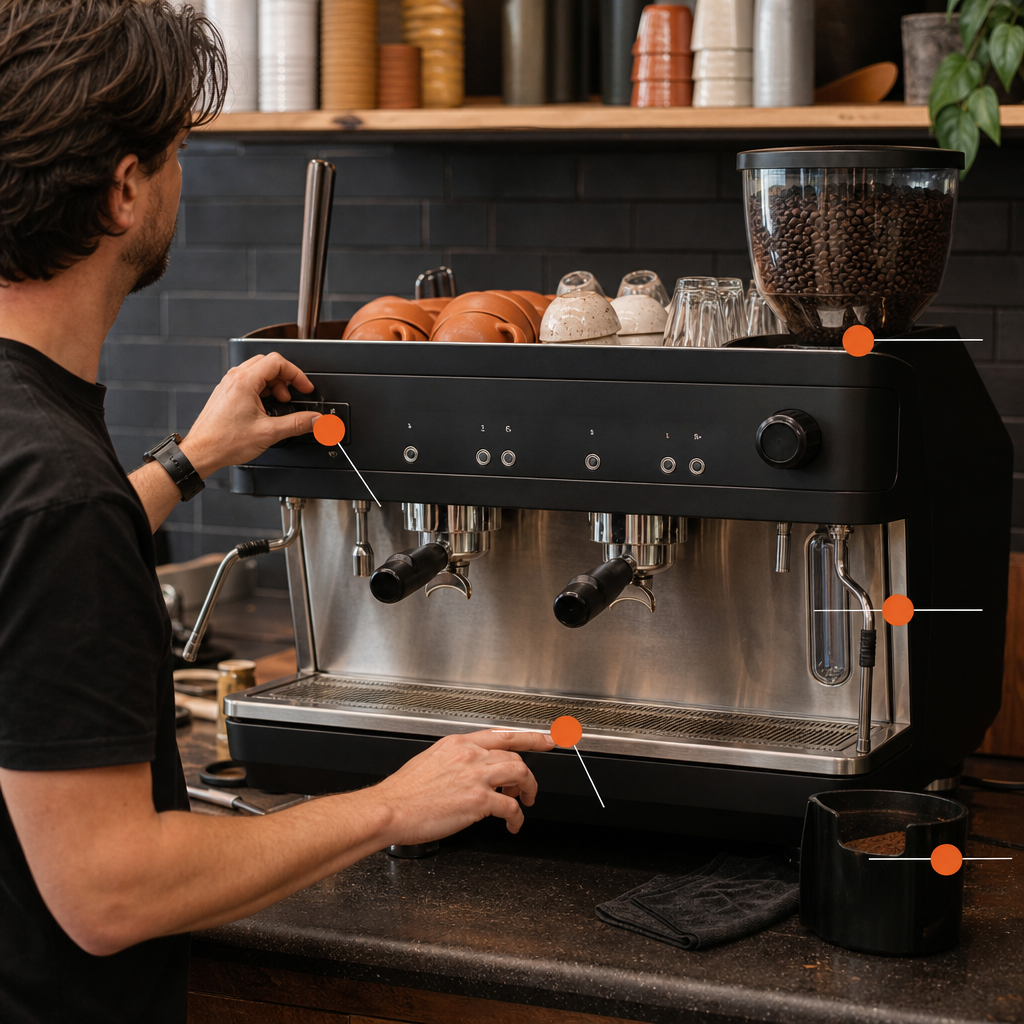
Begin with the controls and components designed for normal staff access. Check power, water, beans, milk, the drip tray, waste container and removable brewing parts. Photograph any error before switching off. Do not open machine panels, bypass sensors or attempt electrical repairs.
Look at the machine before touching it. Water spreading underneath the cabinet, smoke, sparks, damaged cables or a burning smell require immediate shutdown. Disconnect power only if you can do so without contacting water or damaged equipment.
Safe Work Australia's model code for managing electrical risks states that workplace electrical hazards must be eliminated where reasonably practicable or otherwise minimised. That principle matters around coffee machines because electricity, heat and water sit close together.
If there is no obvious safety risk, work through these checks:
- Confirm that the wall outlet and machine power switch are on.
- Check whether the water isolation valve has been closed.
- Confirm that the bean hopper contains beans and is correctly fitted.
- Empty and refit the drip tray and coffee-waste container.
- Check milk lines, bottles or refrigerated milk systems for empty containers and kinks.
- Read the screen before dismissing any notification.
- Perform one normal restart if the manual permits it.
Repeatedly switching a machine off and on is not troubleshooting. It can hide the original message without correcting its cause. If the same fault returns, record it and call the service contact.
How to Read Commercial Espresso Machine Error Codes
Commercial espresso machine error codes are manufacturer-specific, so the complete screen message matters more than a generic online code list. Record the brand, model, exact wording and circumstances. Follow the relevant operator manual, then arrange service if the code persists after the permitted checks.
A code that looks similar across two brands may describe different systems. Even machines from the same manufacturer can use different messages depending on their controls and configuration. Guessing from an unrelated forum can waste time or encourage an unsafe repair.
When reporting an error, provide:
- The exact code and accompanying words.
- A clear photograph of the display.
- The machine brand and model.
- What staff were doing when the message appeared.
- Whether coffee, hot water or steam still works.
- Any unusual noise, smell, heat or visible water.
- The checks already completed.
Some messages are operating prompts rather than breakdowns. They may ask for beans, water, cleaning tablets, an emptied waste container or a correctly fitted component. Complete the requested task only with the approved product and procedure.
Pressure, boiler, heating, motor, sensor and recurring water-flow errors generally need technical diagnosis. Do not clear a warning by bypassing a door switch, float, temperature control or safety sensor. These systems are there to protect staff and the equipment.
What to Do When the Coffee Machine Is Not Grinding

When a coffee machine is not grinding, first confirm that the hopper contains suitable beans, its gate is open and the hopper is seated correctly. Listen for the grinder. Silence can indicate a control fault, while straining or unusual noise can indicate an obstruction requiring service.
Beans sometimes stop feeding even when the hopper looks full. Oily beans can cling together, while foreign material can obstruct the feed path. Turn the machine off as directed by its manual before checking any operator-accessible area. Never put fingers or tools into the grinder.
Avoid pouring water into the hopper or using household cleaning products. Moisture can damage the burrs and cause ground coffee to compact inside the mechanism.
Grinder adjustment also requires care. If coffee runs too slowly, the grind may be too fine. If it gushes through and tastes thin, it may be too coarse. However, flow can also change because of stale beans, humidity, dosage, cleaning or worn components. Moving the setting aggressively can make diagnosis harder.
A commercial setup should have dialled-in beans matched to the grinder and machine. Where staff are expected to adjust the grind, they need a documented procedure. Otherwise, leave the setting alone and report the extraction problem.
Call a technician if the grinder hums without turning, makes metallic or knocking sounds, trips the machine, smells hot or repeatedly displays a motor fault.
How to Clear a Blocked Coffee Machine Steam Wand
A blocked coffee machine steam wand is usually caused by milk residue drying around the tip or inside its openings. Wipe the wand immediately after use and purge it according to the machine instructions. If normal purging does not restore steam, stop rather than forcing objects inside.
Milk residue becomes harder to remove after it dries. Good daily practice is simple: wipe the outside with the designated clean cloth immediately after steaming, then perform the approved purge. The cloth used on the steam wand should not be the same cloth used for benches or waste areas.
If the removable tip is intended for staff cleaning, follow the manufacturer's process. Use the specified milk-system cleaner at the correct dilution. Do not enlarge the steam holes with pins, drill bits or improvised tools. That can damage the tip and alter steam performance.
Weak steam can also indicate something beyond a blocked tip. Possible causes include insufficient heating, a valve problem, internal scale or a boiler fault. Stop and request service if:
- The machine cannot reach normal steam pressure.
- Steam escapes from the controls or machine body.
- The wand leaks continuously when closed.
- A heating or boiler warning appears.
- The wand remains blocked after approved cleaning.
Food Standards Australia New Zealand's food safety requirements support systematic cleaning and sanitising of equipment that contacts food. For an office, that means milk hoses, refrigerated containers and automatic frothing systems need scheduled cleaning, not an occasional rinse when they smell wrong.
Why Coffee Flow, Taste and Temperature Change
Slow flow, weak coffee and inconsistent temperature do not always indicate one failed component. Bean freshness, grind, dosage, cleaning, water supply and machine heat can produce similar symptoms. Compare several consecutive drinks, check the approved cleaning routine and avoid changing multiple settings simultaneously.
When no coffee comes out, check whether the machine is receiving water. Look for a closed isolation valve, empty internal tank, kinked line or water-related screen prompt. If the pump becomes unusually loud without producing water, stop the cycle. Running a pump dry can worsen the problem.
Slow or uneven coffee flow often points to accumulated coffee oils, an incorrect grind or a restricted brewing path. Complete the manufacturer's cleaning cycle with the specified product. Household detergent is not an acceptable substitute because it can leave residue or damage components.
Taste problems should be diagnosed methodically:
- Confirm that the beans are fresh and the hopper is clean and dry.
- Check whether a new blend or roast was recently introduced.
- Complete the approved coffee-system and milk-system cleaning cycles.
- Compare espresso before adding milk, sweetener or flavouring.
- Record whether the issue affects every drink or only one selection.
This is where Boutique Coffee's Curated Coffee Plan matters. The blend is chosen around the team's preference for espresso or milk-based drinks, desired strength and stated dislikes. Feedback is then used to adjust supply rather than treating every office as identical.
Temperature complaints also need context. A cold ceramic cup, refrigerated milk or a large drink can change perceived temperature even when the machine operates normally. A technician should investigate if the machine displays a heating warning, takes unusually long to recover or produces consistently cool espresso and weak steam.
Leaks, Overflow and Water Under the Machine
Water under an office coffee machine may come from an overflowing drip tray, incorrectly fitted waste container, loose accessible hose or internal leak. Dry the area, identify where the water reappears and stop using the machine if liquid approaches the plug, outlet or electrical cabinet.
Start with components staff normally remove. Empty the drip tray, clean its level sensor if the manual allows, and refit the tray fully. Check whether a waste-water container is full or a drain hose has been knocked out of position.
Do not pull a plumbed machine across the bench to inspect hidden connections. That movement can strain the water line, drain and electrical cable. Likewise, do not tighten internal fittings while the machine remains powered and pressurised.
Switch off and request urgent service when:
- Water continues after the machine is turned off.
- The leak comes from inside the cabinet.
- Hot water or steam escapes unexpectedly.
- The wall outlet, plug or cable becomes wet.
- A safety switch trips.
- The machine must be moved to find the source.
Place a clear notice on the machine so another staff member does not switch it back on. A verbal warning is easily missed in a busy office.
When to Call a Coffee Machine Technician

Call a technician when basic operator checks fail, an error returns, or the fault involves electricity, internal pressure, heating, persistent leakage, grinder damage or unusual smells. Staff should handle consumables and approved cleaning. Qualified service personnel should handle covers, wiring, boilers, pumps and internal components.
The practical boundary is straightforward. If the job requires dismantling the machine, using electrical test equipment, disturbing plumbing or defeating a sensor, it is not an office quick fix.
Arrange technical support for:
- Repeated commercial espresso machine error codes.
- Electrical trips, damaged cables or intermittent power.
- Burning smells, smoke or excessive heat.
- Internal leaks or unexplained pressure loss.
- A grinder that is jammed, noisy or overheating.
- Failed boiler, steam or hot-water functions.
- Recurring blockages despite correct cleaning.
- Poor coffee that continues after beans and cleaning have been checked.
Useful fault reporting can shorten diagnosis. Send the technician the display photograph, machine model, symptoms and checks already performed. Mention whether the office still has partial service, such as espresso without steam. That helps the technician decide what parts or replacement equipment may be needed.
Boutique Coffee's own active-client data records a typical response time of 24 hours across its Melbourne service base as of 2026. For urgent disruption, contact Boutique Coffee for emergency support rather than allowing staff to attempt internal repairs.
Preventing Repeat Office Coffee Machine Faults
The best troubleshooting strategy is prevention: match the machine to actual demand, install it correctly, train staff and maintain a consistent cleaning and service rhythm. A machine that is too small, poorly supplied or rarely serviced will create recurring faults regardless of brand.
Machine selection matters more than many offices realise. A small team does not need an oversized premium machine. A large workplace should not rely on light-duty equipment built for occasional use. Boutique Coffee has installed for workplaces with more than 400 people, according to its 2026 business records. Capacity must reflect peak demand, not just headcount.
Installation should also account for bench space, ventilation, water, drainage and available power. Boutique Coffee's workplace coffee process includes an on-site assessment, proper installation, grinder setup, shot testing and staff training. These steps remove common causes of poor performance before the machine enters daily service.
Assign simple responsibilities inside the office:
- Nominate staff who understand daily cleaning and replenishment.
- Keep the correct cleaning products near the machine.
- Display a concise operating and fault-reporting guide.
- Record recurring messages rather than treating each as isolated.
- Keep beans dry and close containers after refilling.
- Do not allow untrained staff to change technical settings.
A maintenance arrangement should cover more than emergency repairs. It should include regular inspection, grinder setup, cleaning advice, beans and consumables. Boutique Coffee currently supports more than 200 active Melbourne workplace rental clients, with an average relationship exceeding five years according to its 2026 client records.
Why One Accountable Person Beats a Support Ticket
My view is that coffee machine downtime is often a support-design problem, not only an equipment problem. One person who knows the office, machine and service history can identify simple faults quickly. A call centre must first discover information the responsible coffee partner already knows.
The supplied 3P Digital case study demonstrates the point. A four-hour response saved an office from total coffee downtime. The value was not an elaborate escalation system. It was fast ownership of the problem before the failed setup disrupted the entire workplace.
That is why I prefer one number, one person. No call centres, no corporate runaround. Many basic issues can be talked through quickly when the person answering knows which machine is installed, how it is plumbed and what has happened previously.
I have seen the operational effect at a busy Melbourne workplace where machine failures had caused havoc during peak office hours. Regular scheduled servicing and direct personal contact meant the team had coffee when it mattered. Reliability came from maintenance and accountability working together, not from waiting for a fault and opening a generic ticket.
This is also why our commercial coffee machine solutions are based on fit rather than upselling. The right machine, dialled-in beans and ongoing service are more useful than impressive specifications with weak support.
Boutique Coffee operates founder-led, always. Rentals are month-to-month, with one month's notice and free machine pickup. No lock-in, ever. The aim is to remain a coffee partner, not a supplier, because the service keeps earning the relationship.
References
The following sources support the electrical safety, food safety and business-specific service information used in this guide. Manufacturer instructions should always take priority for the operation and cleaning of a particular coffee machine model.
- Safe Work Australia, "Model Code of Practice: Managing Electrical Risks in the Workplace": https://www.safeworkaustralia.gov.au/doc/model-code-practice-managing-electrical-risks-workplace
- Food Standards Australia New Zealand, Food Standards Code, Standard 3.2.2 and Standard 3.2.2A: https://www.foodstandards.gov.au/business/food-safety-standards
- WorkSafe Victoria, electrical safety guidance: https://www.worksafe.vic.gov.au/electrical-safety
- Boutique Coffee at Work, active-client, relationship and service records supplied for 2026.
FAQ_SCHEMA_JSON
Frequently asked questions
Why is my office coffee machine not making coffee?
Check power, water, beans, the waste container and any screen message. Refit removable components and run the approved rinse if requested. If the pump runs without producing coffee, an error returns or water is leaking, stop and contact a technician.
Can I reset a commercial coffee machine error code?
You can perform one normal restart if the manufacturer's manual permits it. Photograph the complete message first. Do not repeatedly reset the machine or bypass a sensor. A recurring code usually indicates an unresolved cleaning, supply, sensor or component problem.
Why is the coffee machine not grinding beans?
The hopper may be empty, incorrectly seated or closed at its feed gate. Beans may also be bridging above the grinder. If the grinder hums, smells hot, makes abnormal noises or remains inactive after basic checks, switch it off and request service.
How do I unblock a coffee machine steam wand?
Wipe the wand and purge it using the approved procedure. Clean a removable tip only if the manufacturer permits operator removal. Do not force pins or tools into the holes. Persistent blockage, weak steam or a boiler warning requires technical attention.
Is water under a coffee machine dangerous?
It can be. Empty and refit accessible trays or waste containers, then check whether water returns. Stop using the machine if the source is internal, the leak continues, or water is close to the plug, outlet, cable or other electrical components.
How quickly can an office coffee machine be repaired?
Timing depends on the fault, location and parts required. Boutique Coffee's own 2026 service data records a typical response time of 24 hours across active Melbourne clients. Clear photographs, the exact error message and an accurate fault description can help speed diagnosis.

Chris
Chris
Keep reading
Comprehensive Corporate Coffee Solutions: Elevating Australian Workplace Experiences
Corporate coffee machine solutions combine commercial equipment, installation, fresh beans, staff training, maintenance and responsive support in one workplace…
Office Coffee Machine Installation Guide: What Australian Businesses Need to Know
Installing an office coffee machine starts with matching the equipment to your team, then confirming power, potable water, drainage, bench space, ventilation…
Understanding the Daily Cost of a Commercial Coffee Machine in an Australian Office
The cost of a commercial coffee machine per day equals daily beans, milk, electricity, water filtration, cleaning, rental or equipment ownership, and…